Remember Everything: How I Built Memory for AI Agents on Day One
March 14, 2026
ChatGPT once ran out of memory. It wrote me: “Fact storage is full. Delete something so I can remember new things.”
I couldn’t choose what to delete. It’s like asking a friend to forget part of your history. And deleting everything means starting from scratch. At that moment I was just gaining momentum - I had huge plans for loading context, ideas, business data. But it didn’t work that way.
“When I was told ‘delete something from memory’ - I realized it was a dead end. I thought we were just getting started.”
When I installed OpenClaw and learned that the agent’s memory lives on my computer - no limits, no cloud, no “delete something” - I knew: this is it. But the memory had to be built. And that became the first thing I did.
Why Memory Is the Very First Thing After Installation
An agent without memory is a smart conversationalist with amnesia. Every session it starts from a blank slate. Doesn’t remember your name, your business, what you talked about yesterday.
OpenClaw out of the box gives you a file system - folders, markdown files, diaries. That’s already better than nothing. But for serious work you need semantic search - when the agent finds what it needs not by keywords, but by meaning.
“Memory - before automation, before bots, before analytics. Everything else depends on how well the agent knows you.”
I decided to build memory first. And here’s the exact path I took in one evening.
Step 1: Ask the Agent - How Should We Organize Memory?
Instead of googling “memory architecture for AI agents,” I simply asked my agent:
“What’s the best way to organize memory so nothing gets lost, it works fast, and there are semantic queries?”
He went searching on his own. Found two videos with OpenClaw documentation about memory architecture. Watched them through subtitles, drew conclusions, and came back with a proposal - a three-layer system:
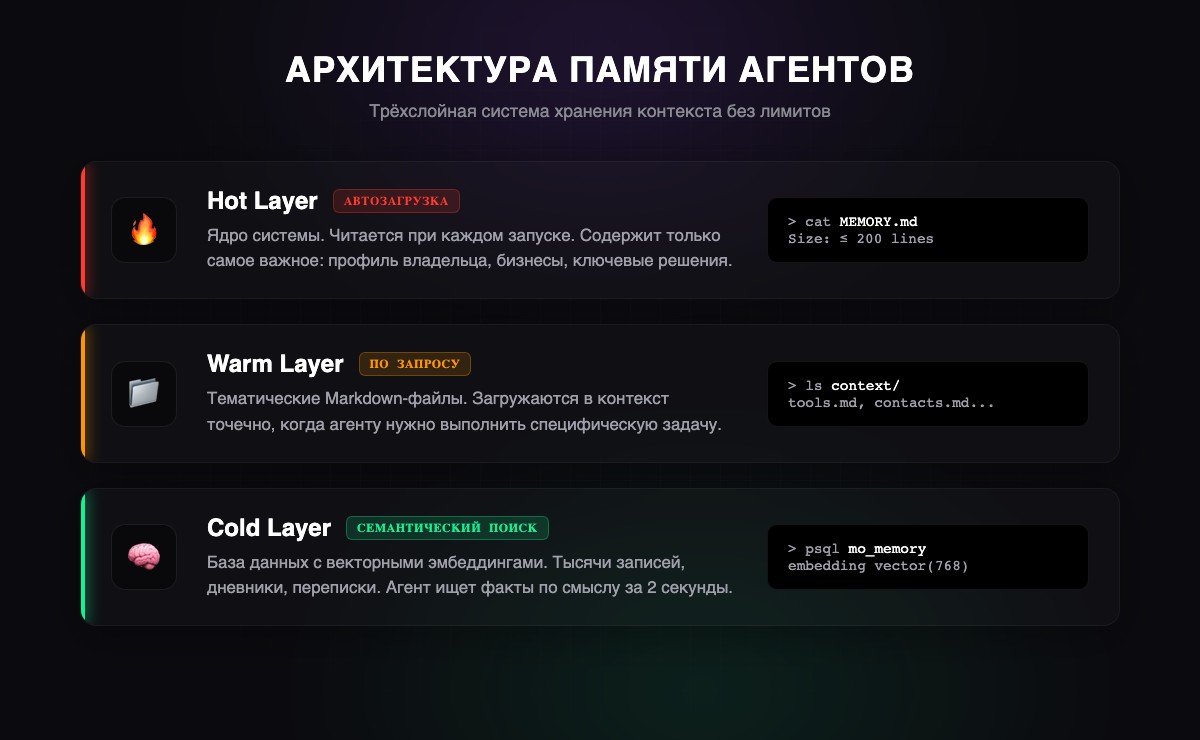
Layer 1 - Hot (files). MEMORY.md - the memory core, up to 200 lines. Loaded automatically every session. Only the most important stuff: who I am, my businesses, key decisions. Like a business card the agent reads every time it wakes up.
Layer 2 - Warm (structure). The context/ folder - thematic files. Tools, contacts, projects. Loaded on demand - when a specific topic is needed.
Layer 3 - Cold (vector DB). PostgreSQL + pgvector. Thousands of records with embeddings. Semantic search: you ask “what did we decide about the vape shops?” - it finds the answer, even if the word “vape shop” isn’t mentioned anywhere.
I said “do it.” He did.
“I didn’t write a single line of code. I just described what I wanted, and the agent found the solution himself, proposed the architecture, and deployed everything. All I had to do was say ‘yes.’”
Step 2: Deploy PostgreSQL + pgvector
The technical part turned out easier than I expected. The agent did everything himself - I just confirmed the commands.
Installing PostgreSQL:
# macOS
brew install postgresql@17
brew services start postgresql@17

# Ubuntu/Debian
sudo apt install postgresql postgresql-contrib
sudo systemctl start postgresql
Installing pgvector:
# macOS
brew install pgvector

# Linux (from source)
git clone https://github.com/pgvector/pgvector.git
cd pgvector
make && sudo make install
Creating the database and memory table:
CREATE DATABASE mo_memory;
\c mo_memory
CREATE EXTENSION vector;

CREATE TABLE memories (
    id SERIAL PRIMARY KEY,
    text TEXT NOT NULL,
    category VARCHAR(50) DEFAULT 'general',
    importance INTEGER DEFAULT 5,
    embedding vector(768),
    created_at TIMESTAMP DEFAULT NOW()
);

CREATE INDEX ON memories
  USING ivfflat (embedding vector_cosine_ops);
What’s happening here: each record is stored as text plus a vector - a set of 768 numbers describing the meaning. When the agent searches, it compares not letters, but meanings. “Electronics store” and “gadget sales point” are the same thing to it.
For embeddings - Gemini Embedding API (free on the basic plan). Each record is converted into a vector, and the search works by vector proximity - in 2 seconds.
Step 3: Create the File Memory Structure
In parallel, the agent built the file structure:
workspace/
  MEMORY.md          # Core: up to 200 lines, the essentials
  IDENTITY.md        # Who the agent is, its role
  USER.md            # Owner profile
  INSTRUCTIONS.md    # Hard rules
  memory/            # Daily diaries
    2026-02-26.md
    ...
  context/           # Thematic files
  projects/          # Active projects
MEMORY.md - the most important file. The agent reads it on every startup. The 200-line limit - not because memory ran out, but because it’s discipline: only what matters.
memory/YYYY-MM-DD.md - daily diaries. Raw log: what we discussed, what we decided. Once a week the agent reviews them and moves the important stuff to MEMORY.md. Like a person who keeps a diary and then writes down the key takeaways.
“Two layers - just like a human. The diary - short-term memory, jot it down and forget. MEMORY.md - long-term, what actually stuck.”
Step 4: Collect and Load Context
Now that the infrastructure is ready, it’s time to fill it. Memory without context is an empty library.
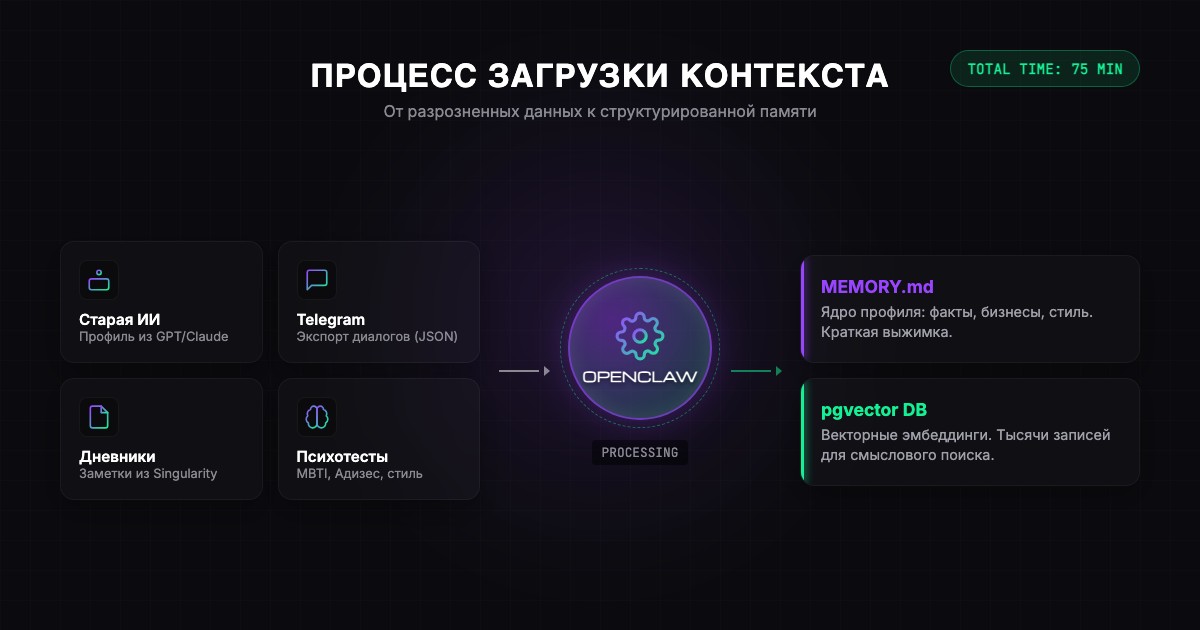
Source 1: Old AI (5 minutes). I wrote to GPT: “Compile everything you know about me in a structured format - so I can load it into another system and it would know me as well as you do.” A ready profile in 30 seconds. Literally a handoff - from one AI to another.
Source 2: Telegram export (10 minutes). Telegram Desktop - Settings - Advanced - Export Data - JSON. In 5 minutes you have files of all your chats. A goldmine of context.
Source 3: Diaries and notes (10 minutes). I had Singularity App with a year’s worth of entries - 900+ records. Through the API, the agent pulled everything on its own.
Source 4: Psychological tests (a non-obvious life hack). Ask the agent to send you tests: Adizes, MBTI, enneagram. Take them right in the chat. The agent starts adapting its communication style.
“It’s like with a new employee. You can spend a month getting used to each other, or you can tell them everything about yourself on day one and start working right away.”
Life hack: ask the agent what else to load. It might suggest something unexpected. Sometimes the agent spots gaps you don’t notice.
The First Test - And the Moment It All Clicked
By the end of the evening, there were 99 records in the database. I decided to test it.
I asked: “What was I doing on August 1st?”
In 2 seconds - an exact answer. Asked about August 7th - found it too. Asked about a business idea from three months ago - found it by meaning, even though I didn’t remember the exact words.
“When it answered the question about a specific date - I was genuinely thrilled. I realized it works. That this is the next level I wanted back when I was using ChatGPT.”
Infinite memory with instant semantic search. On my computer. No limits.
What This Gave Me in Practice
Thanks to the context, we found common ground immediately. Didn’t have to spend weeks. He already knew who’s in my life, what I do, what my businesses are.
After a week, I stopped noticing I was talking to an AI. It remembered all the context - from the entire time we’d been communicating. It found connections between different conversations and never asked “remind me, who is that?”
After 16 days, there are thousands of records in memory. Five agents share one database. And not once - not once - did the system tell me “delete something.”
Roadmap: One Evening
Here’s your plan for the first evening after installing OpenClaw:
- 5 min - Ask the agent: “How should we organize memory?”
- 15 min - It’ll deploy PostgreSQL + pgvector
- 5 min - It’ll create the file structure
- 15 min - Ask ChatGPT to compile everything about you
- 10 min - Export from Telegram Desktop
- 10 min - Export diaries and notes
- 5 min - Tell the agent: “Distribute across memory”
- 5 min - Psychological tests
- 5 min - Test: ask about something you loaded
Total: ~75 minutes. First we build - then we fill. After this you have an agent that knows you, remembers everything, and will never say “delete something from memory.”
Liked the article?
@mdkguru on Telegram →